I have a hobby network full of mostly software routers in L3 mode predominately running Linux and a few running FreeBSD. There are some network ASICs in the mix but their functions are specialized. Over the years as the network ages I replace aging gear with newer equipment that is usually quieter, cooler, and sucks much less power. I have this weird expectation that the newer gear will also be faster, which, in my mind, equates to lower latency when it comes to a packet forwarding perspective. Unfortunately, I was starting to see the exact opposite effect while staying at the same link speeds (most are 1Gbps with some 100Gbps for lab) and that led me down a rabbit hole. I’ll explain “one simple fix” (no, not /that/ one) that gets me a good balance of latency & thermals and what led me there in this post.
Here’s the problem I was seeing:
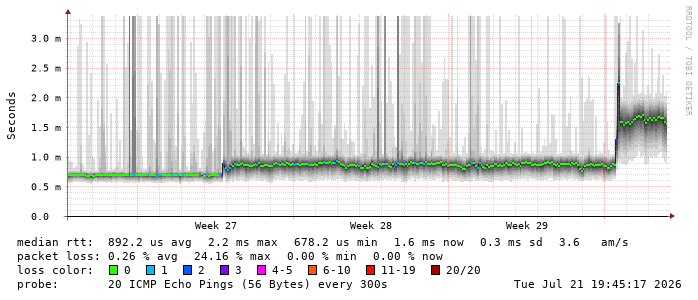
This is a SmokePing graph between my file server and a Cisco WAP in the loft all at home. The network hops are:
File Server --> EX2200-C VC (L2)
                         |
                         |
              Linux Router (starfire) --> EX2200-C VC (L2)
                                                |
                                                |
                                 Linux Router (trill) --> Cisco WAP
Why the heck am I showing a Cisco WAP as a ping target? The answer is horrible but it’s because it doesn’t implement any power saving unlike a macOS or even modern Linux system so the latency shown will be /mostly/ network-induced vs. generated by the host.
My Linux routers run stock kernels (nowadays they’re late 6.x series or 7.0/7.1) and, other than some cloud VMs, run amd64/x86_64. I use FRR as the routing daemon suite with BGP+OSPF and IPv4+IPv6. Between sites I use OpenVPN & WireGuard but if you want to learn more about that & AS395460, hit the wiki link above.
Coming back to the graph, here is an explanation of the timeline:
Before week 27:
- trill was an old Intel Atom (D2700: 2-core 2.13 GHz) box with Intel Gigabit NICs (82541GI)
- starfire was an Intel Xeon E3-1245 v3 (3.4 GHz) box with Intel 2.5Gbps NICs (I225-V), although the link speed here is only 1 Gbps
Between week 27 and the “higher latency” spike at the end, I upgraded starfire to a Xeon E3-1245 v6 (3.7 GHz) box. Long story short is that the old box (Lenovo ThinkServer TS140) died due to instability and I replaced it with a slightly newer revision from eBay on the cheap.
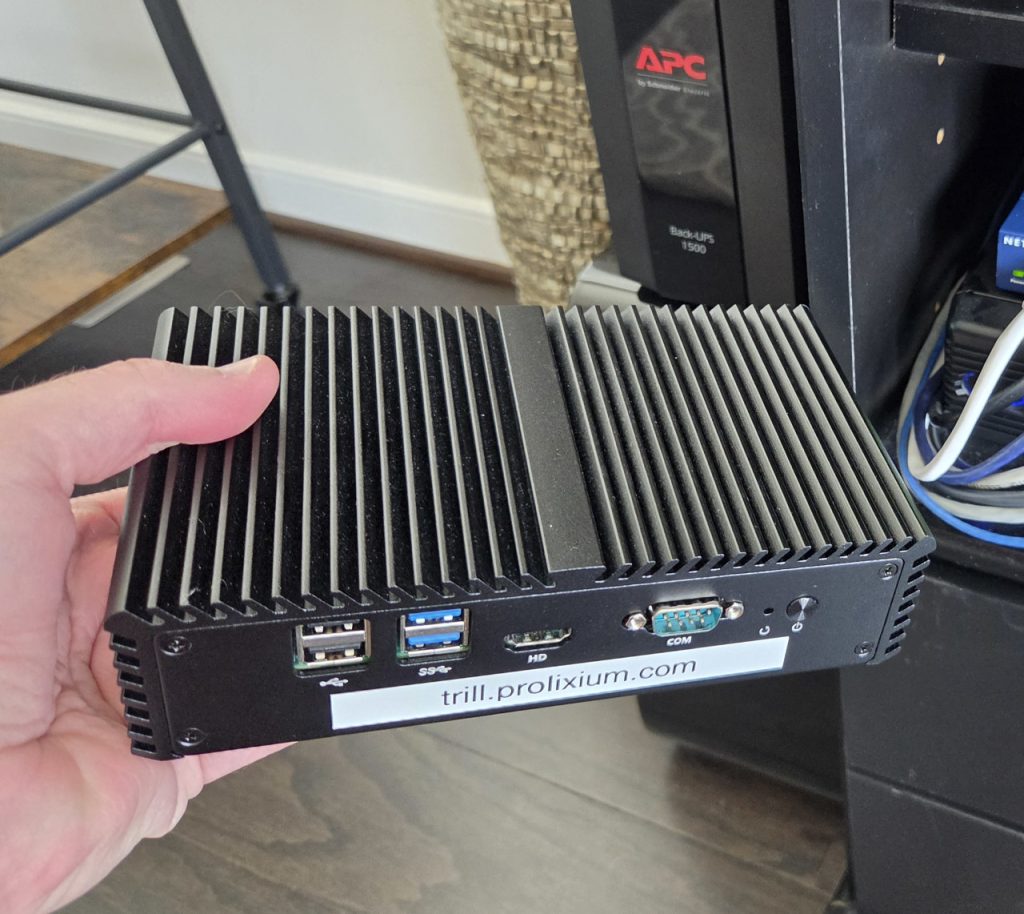
The transition to the much higher latency at the end was due to me replacing trill with a Qotom box, Intel Core i7-7500U laptop CPU, which was a long overdue upgrade. The NICs are now i211ATs. The original trill was a Jetway box from 2010 or so.
While I couldn’t feel any effects of the latency (heh, 1.5ms – humans using something like SSH can really only start feeling it around 20-30ms and then it doesn’t become really evident until 60 or so), this annoyed me since I had faster and cooler routers now that should get me lower forwarding latency, not higher!
Anyway, I wanted to fix it. My first thought was that I could change the CPU frequency scaling governor to something better than powersave. Well, that did nothing:
(starfire:11:12:EDT)% cpupower frequency-info
analyzing CPU 2:
  driver: intel_pstate
  CPUs which run at the same hardware frequency: 2
  CPUs which need to have their frequency coordinated by software: 2
  energy performance preference: performance
  hardware limits: 800 MHz - 4.10 GHz
  available cpufreq governors: performance powersave
  current policy: frequency should be within 800 MHz and 4.10 GHz.
                  The governor "performance" may decide which speed to use
                  within this range.
  current CPU frequency: Unable to call hardware
  current CPU frequency: 3.90 GHz (asserted by call to kernel)
  boost state support:
    Supported: yes
    Active: yes
That did pretty much absolutely nothing. And, my only options were performance & powersave with intel_pstate, unlike with the acpi-cpufreq from back in the day. Latency didn’t budge and thermals didn’t change either. I think the scaling_governor with intel_pstate really doesn’t make that much of a difference anymore like it did with older governors like acpi-cpufreq or even super old stuff like p4-clockmod. I even tried changing the minimum performance percentage (whatever that actually does) from 11 to 100:
cat /sys/devices/system/cpu/intel_pstate/status
active
cat /sys/devices/system/cpu/intel_pstate/min_perf_pct
11
cat /sys/devices/system/cpu/intel_pstate/max_perf_pct
100
cat /sys/devices/system/cpu/intel_pstate/no_turbo
0
echo 100 | sudo tee /sys/devices/system/cpu/intel_pstate/min_perf_pct
100
echo 100 | sudo tee /sys/devices/system/cpu/intel_pstate/max_perf_pct
100
echo 0   | sudo tee /sys/devices/system/cpu/intel_pstate/no_turbo
0
Nothing. No change that I could see.
I even changed the minimum clock frequency to max HW, as well. On starfire it started like this:
(starfire:12:10:EDT)% for c in /sys/devices/system/cpu/cpu*/cpufreq; do
for>     printf '%-8s hw=%4d–%-4d policy=%4d–%-4d MHz\n' \
for>         "$(basename "$(dirname "$c")")" \
for>         "$(( $(<"$c/cpuinfo_min_freq") / 1000 ))" \
for>         "$(( $(<"$c/cpuinfo_max_freq") / 1000 ))" \
for>         "$(( $(<"$c/scaling_min_freq") / 1000 ))" \
for>         "$(( $(<"$c/scaling_max_freq") / 1000 ))"
for> done
cpu0     hw= 800–4100 policy= 800–4100 MHz
cpu1     hw= 800–4100 policy= 800–4100 MHz
cpu2     hw= 800–4100 policy= 800–4100 MHz
cpu3     hw= 800–4100 policy= 800–4100 MHz
cpu4     hw= 800–4100 policy= 800–4100 MHz
cpu5     hw= 800–4100 policy= 800–4100 MHz
cpu6     hw= 800–4100 policy= 800–4100 MHz
cpu7     hw= 800–4100 policy= 800–4100 MHz
I changed everything to 4100:
(starfire:12:13:EDT)% sudo cpupower frequency-set -d 4.1GHz
Setting cpu: 0
Setting cpu: 1
Setting cpu: 2
Setting cpu: 3
Setting cpu: 4
Setting cpu: 5
Setting cpu: 6
Setting cpu: 7
(starfire:12:14:EDT)% lscpu --extended=CPU,CORE,SOCKET,NODE,MAXMHZ,MINMHZ
CPU CORE SOCKET NODE    MAXMHZ   MINMHZ
  0    0      0    0 4100.0000 800.0000
  1    1      0    0 4100.0000 800.0000
  2    2      0    0 4100.0000 800.0000
  3    3      0    0 4100.0000 800.0000
  4    0      0    0 4100.0000 800.0000
  5    1      0    0 4100.0000 800.0000
  6    2      0    0 4100.0000 800.0000
  7    3      0    0 4100.0000 800.0000
(starfire:12:14:EDT)% for c in /sys/devices/system/cpu/cpu*/cpufreq; do
    printf '%-8s hw=%4d–%-4d policy=%4d–%-4d MHz\n' \
        "$(basename "$(dirname "$c")")" \
        "$(( $(<"$c/cpuinfo_min_freq") / 1000 ))" \
        "$(( $(<"$c/cpuinfo_max_freq") / 1000 ))" \
        "$(( $(<"$c/scaling_min_freq") / 1000 ))" \
        "$(( $(<"$c/scaling_max_freq") / 1000 ))"
done
cpu0     hw= 800–4100 policy=4100–4100 MHz
cpu1     hw= 800–4100 policy=4100–4100 MHz
cpu2     hw= 800–4100 policy=4100–4100 MHz
cpu3     hw= 800–4100 policy=4100–4100 MHz
cpu4     hw= 800–4100 policy=4100–4100 MHz
cpu5     hw= 800–4100 policy=4100–4100 MHz
cpu6     hw= 800–4100 policy=4100–4100 MHz
cpu7     hw= 800–4100 policy=4100–4100 MHz
Again.. NOTHING.
I then asked some friendly LLMs and they pointed me to things like locking interrupts to specific cores to prevent interrupts bouncing between cores, lowering NIC interrupt coalescing, and reducing txqueuelen. All of this did absolutely nothing.
I went back to this RedHat support article I found a few years back that pointed to /dev/cpu_dma_latency as a way to turn the whole system into the equivalent of setting idle=poll on the kernel command line. The effect of this was instantaneously lower latency but the CPU started pulling max power and got pretty hot immediately.
(starfire:12:04:EDT)# cat > /dev/cpu_dma_latency
0
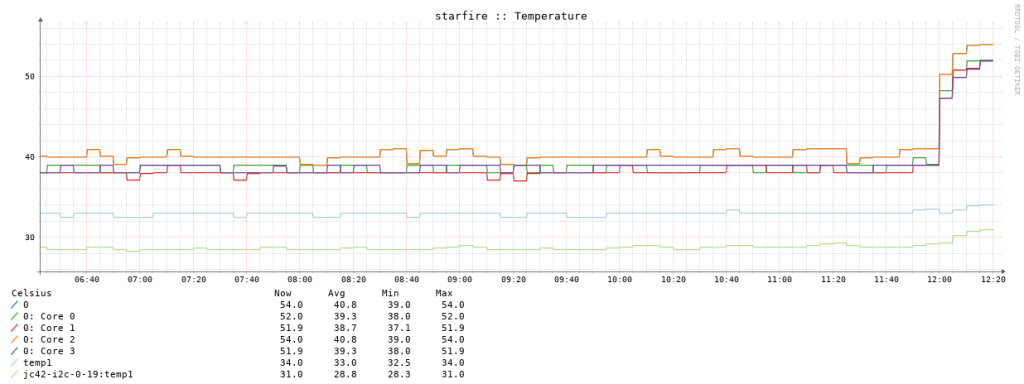
Obviously, this was not a fix but it did highlight that CPU power saving was indeed at fault for latency increases. Surprisingly, the 1245 v6 didn’t get /that/ hot compared to when I tried this on my i9-14900KS desktop, which caused it to edge up against TJ (100°C) within a few minutes.
With some more LLM help I looked at the latency figures for what Intel calls C-states. C states are idle states where P states are run states. T state is for thermal throttling and S states are sleep states (e.g. suspend to RAM). Anyway:
(starfire:12:24:EDT)% for s in /sys/devices/system/cpu/cpu2/cpuidle/state*; do
    printf '%s: name=%s latency=%sus disabled=%s\n' \
        "$(basename "$s")" \
        "$(cat "$s/name")" \
        "$(cat "$s/latency")" \
        "$(cat "$s/disable")"
done
state0: name=POLL latency=0us disabled=0
state1: name=C1 latency=2us disabled=0
state2: name=C1E latency=10us disabled=0
state3: name=C3 latency=70us disabled=0
state4: name=C6 latency=85us disabled=0
state5: name=C7s latency=124us disabled=0
state6: name=C8 latency=200us disabled=0
state0 is the equivalent of toggling the /dev/cpu_dma_latency knob. Everything else is an idle state with state6 (C8) consuming the least amount of power. However, C8 takes the longest to transition out of that state, unlike C3 or even C1.
[As I was re-reading this page it occurred to me that “latency” is overloaded. Right in this section we are describing C-state transition latency and NOT the packet forwarding latency, although we’re seeing that the former impacts the latter. Also, while I did not mention it in this page, these C-states are also called “PM QoS” or “power management quality of service” that also conflicts with QoS in network engineering, which is NOT what we’re messing with here at all.]
I started playing with the disabled= knob on these and settled on disabling all except state1/C1:
for s in /sys/devices/system/cpu/cpu*/cpuidle/state*; do
    [ "$(cat "$s/name")" = "C1" ] || echo 1 > "$s/disable"
done
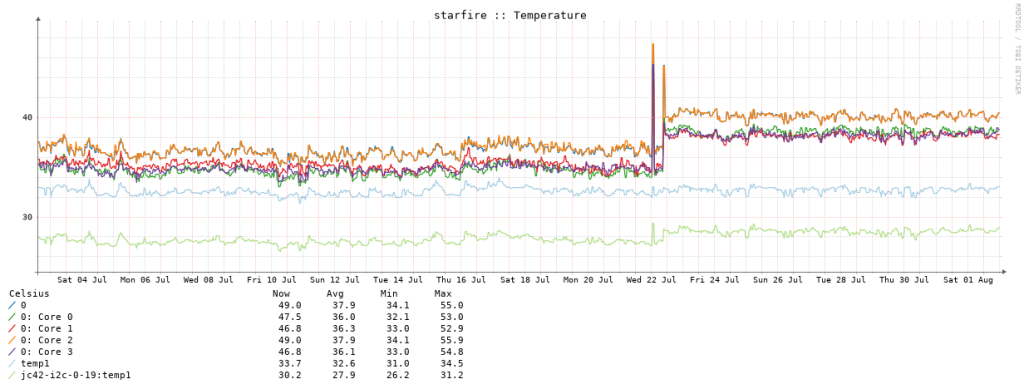
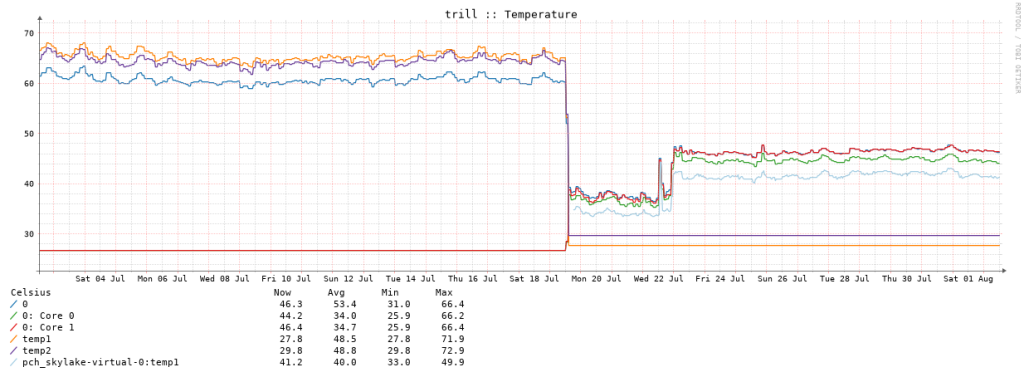
This was the sweet spot. It worked on both the 1245 v6 and i7-7500U. For the 1245 v6 (starfire), here are thermals for about a week and a half:
And here’s latency (both starfire & trill set to C1 only):
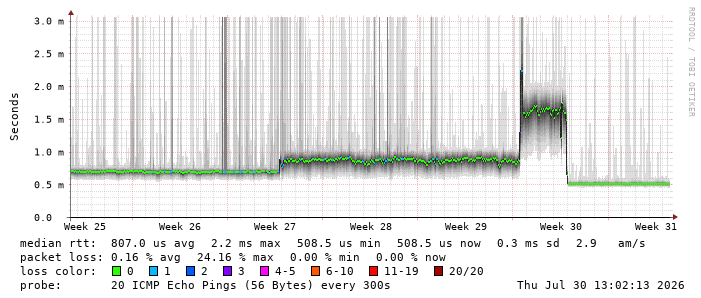
Basically, the graph is the same as the first one in this blog just showing the using C1. Latency is now lower than it was before both trill & starfire were upgraded. trill’s thermals for the i7-7500U are so much better than the Atom D2700, which made the whole Jetway case pretty hot. Both it and the Qotom chassis are passively cooled and the whole Qotom box is a heatsink, it’s not really that warm to the touch.
Thermals showing the D2700, default C-states, then C1 only:
I haven’t looked at overall power consumption too closely since I don’t have a good way to measure that right now (yes, there is an APC Back-UPS Pro in the background but I’m not pulling watts from apcaccess just yet).
As I was writing this I toggled /dev/cpu_dma_latency for a few minutes and watched the SmokePing graph and it seems POLL is indistiguishable from C1, which makes me believe I can probably optimize further for thermals and possibly try C1E or C3. But, I’m pretty happy with C1 so I’ll keep it there for now.
There’s probably some equivalent for AMD but I don’t have any bare metal AMD Linux routers right now so that will have to be an exercise for the future.
If you scrolled to the bottom to see the solution I’ll reproduce it here. Just set this at boot if you use intel_pstate or execute it from the shell as root:
for s in /sys/devices/system/cpu/cpu*/cpuidle/state*; do
    [ "$(cat "$s/name")" = "C1" ] || echo 1 > "$s/disable"
done